Image Map

Wednesday, January 16, 2013

Fast forward or Rewind???

I am confused. Where do I go from here?

It all began on a Monday. A Monday in which I wanted to finish our research on Penguins that we had been working on last week. The common core, researched based, writing workshop, reading Penguins book that they wrote. We did the final page and made the Table of Contents.


So we finished it. Since I had taken stolen some minutes from our normal Monday introduce our spelling pattern, work on high frequency words from our basal text, etc. = we were behind.

Fast forward to Tuesday. Rainy day Tuesday. Flooding roads Tuesday. We got to school to gasp hear that we were going home before lunch, Do you know how teachers and kids react to this? Well.  out minds wander to those free from school hours that are coming soon.

I crammed spelling introduction, vocabulary with new dictionary skills introduced for the first time, and quickly reading our basal stories.

We left at 10:30 a.m. Well, car riders left then. Bus riders not so soon. We sent home three buses (those that don't serve the high school) at 10:30. The remaining kids sat...in the front hallway areas of our round space shaped school,,,for about a hour. Some were still waiting at NOON.

So now the problem. We are out of school today for flooding. Tomorrow is not decided yet but I won't be at school since my mom is having surgery. Anyway you look at this is the earliest I will be back at school is Friday. What would you do? Just start anew next week? Forget this week happened? Oh, and by the way--next week is a four day week.

I think I'll think about all this...another...day!


Sunday, January 6, 2013

How I Plan

I like to cut. I like to copy.. AND...I love to paste. Anything that will help me get my plans done in a somewhat timely manner.

My grade level helps each other. We all take a subject area and do the searching, finding, and rescue! :)
Well, you get the idea. Each month we rotate the areas so that we are getting to experience the full effects of all curriculum areas. Since we are required to turn in plans each Monday--and that means plans containing common core standards, assessments, etc. it has really helped us to combine our efforts.

Since each of us has  a subject, we put the week's activities on a powerpoint and email it to each other. Then we can copy and paste, add to, change, etc. This allows us to work within our class needs and not eliminate areas of concerns.


How I do Lesson Plans

I've recently been adding pictures and examples so that I can have a better memory of exactly what I wanted an anchor chart to contain, etc.


Saturday, December 29, 2012

So Long...2012

Whew! I can't believe it will be 2013 when we return next WEDNESDAY! I am a little somewhat sad one to be returning in the middle of the week. After all, my mind plans for five day weeks. You know--beginning on a Monday and ending on a Friday.

With that little added bit, I've been trying to plan. Think and plan. Get motivated and plan.

We will do a little of Happy New Year. I have some collections of review and "fun" type activities that I managed to dig out of my files. 

Penguins and Tacky. I love Helen Lester's books. And...our Treasures basal story for the first week of Unit 4 is Birds so it stands to reason that I can do some fiction before we begin the non-fiction.

026

Abby over at The Inspired Apple shared a work station that she used. You can access the original owner here. We will review consonant blends and digraphs some before starting a new phonetic pattern.

I also want to do more vocabulary work. I had just introduced vocabulary journals in December. I will choose some words to work on that come straight from Tacky! Odd. Switch.  March. A great time to work with multiple meaning words and their use in context!

To go along with the Common Core I plan on letting small groups give the details of various "Tacky" books. 

024

I just printed labels similar to these and will use small chart paper for my firsties to use!

penguins1

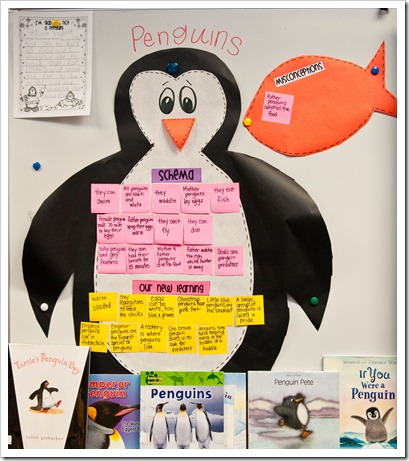
We can move into the research area of Common Core when we learn more about them. I think I will combine this with the writing workshop time and let each child write their own researched project with a table of contents, drawing, captions, close-up, and map. It's always hard to fit science and social studies in the minutes of my day so I think this will work wonderfully. The above pic is from The First Grade Parade. 

And to conclude--a few pics of my firsties working with counting patterns.


Monday, December 24, 2012

Saturday, December 22, 2012

Blog makeover 101

Indecisive! Always changing. Fifteenth change in my blog look--maybe! With both a teaching blog and a personal blog it adds to the pain.

I found a simple way to change it.by.myself. No $$$. Well, there are all the scrapbook kits I have purchased. But...still.


See what I mean. 

  • Use powerpoint to create the header by putting shapes, filling them with my scrapbook backgrounds.
  • Add embellishments that are also part of the kits I have ordered.
  • Create text by inserting text boxes and using different, favorite fonts and Word Art.
Then...select all, copy and paste into:

Paint.

Then it is an easy process.
I can crop it, resize it, and save it as a jpeg.

Changing the background isn't too daunting. Decide which background I want to use and upload it to Photobucket. Copy the http. link.

Now back to my blog and go to HTML. I know nothing about HTML other than it is really, really scary! I mean really, really, really scary. If you scroll down through all the various lists of whatever is there you will come to one that has the word background. That is it. Go to the part that is within the () and if you look carefully. It looks a great deal like the link you copied and pasted. Go ahead and put your cursor there and delete that portion. Insert the part you just copied and then...here is the best part...preview it. If it is fine you succeeded. If it isn't right then you can look right beside that preview button and you can delete the changes you made. AH. 

The image that is saved in Paint as a jpeg can be inserted into the layout section. There is an image near the top I just delete that image and insert my new one.


I make a divider the same way. 
  • Create a divider
  • Select all, copy, paste in Paint.
  • Resize and crop.
  • Save as a jpeg.
Go back to the HTML that now isn't nearly as scary and scroll down the multitude of information til you find one that has the word divider. Find the () and delete and paste your new divider!

Good luck!